
LinkedIn just rolled out two brand-new engagement metrics (Saves and Sends), and they could change the way you measure content performance on the platform.
Until now, most creators tracked success through likes, comments, and reposts.
But those metrics only told part of the story.
Many of the strongest signals, like saving a post to revisit later or privately sharing it in a DM, happened behind the scenes.
With Saves and Sends, LinkedIn is finally making that hidden engagement visible.
I’ll walk you through:
- What LinkedIn Saves and Sends mean
- How they work inside your analytics
- Why creators see them as valuable new signals
What are LinkedIn Saves and Sends (and how do they work?)
1. LinkedIn Saves
Saves show you how many people bookmarked your post to come back later. That simple number is one of the clearest signals that your content has lasting value.

Posts like guides, LinkedIn carousels, or templates are often the type of content people want to keep on hand, and now you can track exactly how often that happens.
When someone taps the bookmark icon on your post, it counts as a Save. LinkedIn then displays the total in your engagement analytics. (See full LinkedIn metrics)
2. LinkedIn Sends
LinkedIn Sends, measure how many times your post was shared in a private LinkedIn message.

With DM activity growing quickly on the platform, this metric is a powerful way to see which posts spark one-to-one conversations behind the scenes.
Whenever a user clicks Send to drop your content into someone’s inbox, it’s added to your analytics alongside likes and comments.
Here’s what the metrics look like:
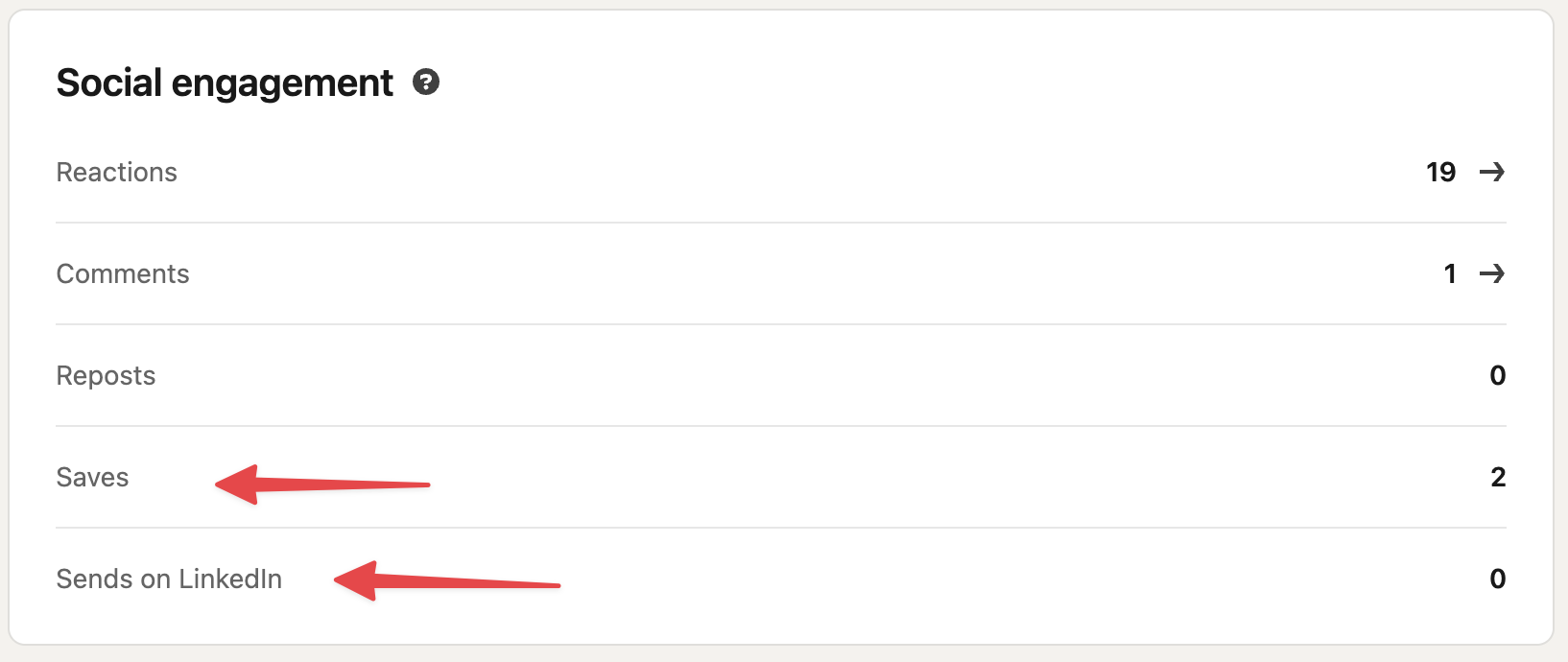
Unlike public engagement (likes, comments, reposts), Saves and Sends show you which posts people value enough to keep or share privately.
📌 Note: LinkedIn is rolling this update out gradually. If you don’t see Saves and Sends in your analytics yet, they should appear in the coming weeks.
What creators think about LinkedIn Saves and Sends
Many creators see them as a step toward more meaningful and deeper analytics.
Saves are being called “a strong metric,” since they show real long-term value.
Sends are helping creators who want to understand how often their posts are shared privately in DMs.
Some creators are simply reacting with curiosity and excitement:

Others note how widely it’s already being discussed across LinkedIn:

And some are eagerly refreshing their app, waiting for the update to appear:

For anyone building a personal brand on LinkedIn or an audience, these early reactions highlight how important these hidden metrics will become.
They don’t just track visibility, they capture value and trust.
And with tools like Podawaa helping you boost reach, you can now measure not just how many people see your content, but how many save it for later or share it in private.
💡 With Podawaa, you can target the right audience and boost your LinkedIn post visibility with more likes and comments (from real people).
Try Podawaa for Free →What’s next for LinkedIn analytics?
LinkedIn has been rolling out analytics faster than ever. LinkedIn wants to give creators a deeper picture of engagement.
- Deeper action tracking: LinkedIn now shows profile views, followers, and link clicks from posts. Many creators hope this will expand to messages or even new connections.
- Better format insights: analytics already break down how links and documents perform, with room for more detail across videos and carousels.
- Benchmarking: not yet live, but a common request is to compare performance against peers, similar to other platforms.
Creators are already asking for even more detailed breakdowns.
For example, some want to see impressions split between followers and non-followers, similar to how YouTube separates subscribers from non-subscribers.

The direction is clear: LinkedIn wants to give creators a fuller picture of engagement and long-term value.