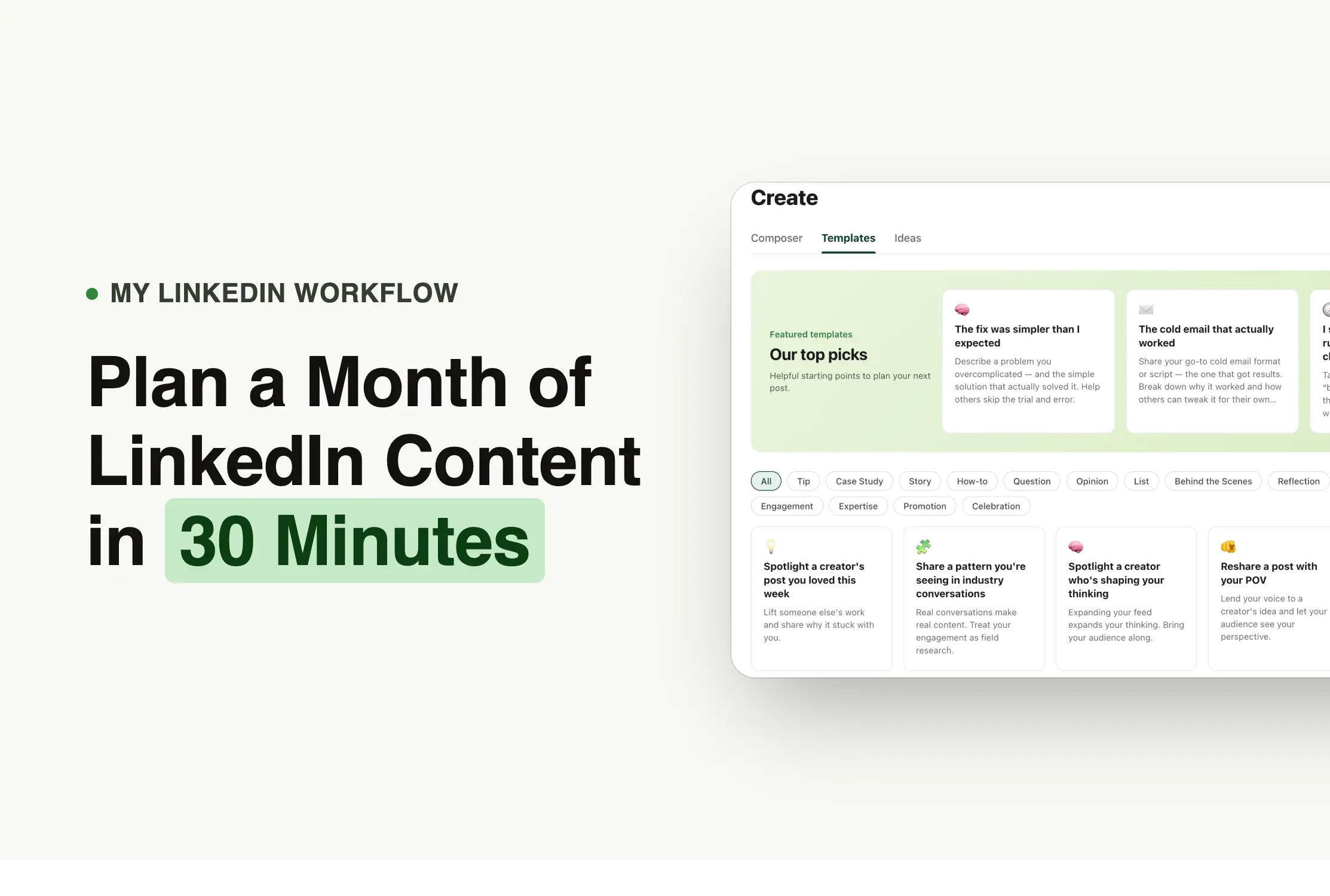
After reviewing creator workflows across LinkedIn, Reddit, creator interviews on YouTube, and breakdowns from creators with audiences over 100K, one pattern kept repeating.
The creators who stayed consistent were not more creative than everyone else. They had a better content system.
Here are the six steps I use to plan an entire month of LinkedIn content in about 30 minutes.
Key Takeaways
- Plan one full month of LinkedIn content in a single session instead of deciding what to post every day
- Stick to two or three content pillars to build a recognizable personal brand over time
- Mix different post formats each month: stories, case studies, educational posts, and personal updates
- Use templates to remove the blank-page problem and start writing faster
- Use AI for first drafts, then rewrite with your own experience and specific examples
- Strengthen your hook and add a first comment before every post goes live
- Schedule everything before the month starts so the month runs itself
To know more, you can check our video below that walks through the full workflow inside Podawaa in real time.
Why Most LinkedIn Creators Struggle to Stay Consistent
Every time you open LinkedIn to write a post, you are making five decisions at once:
- What topic should I cover?
- Which format should I use?
- How should I start?
- Is my hook strong enough?
- When should I publish?
Making all five decisions simultaneously, under pressure, every few days, is what burns people out. After reviewing dozens of creator discussions on Reddit and workflow breakdowns on YouTube, the same complaint kept appearing. People were not running out of ideas. They were exhausted from repeating the same creative process from scratch, every single time.
The creators who stayed consistent solved this differently. They batched all five decisions once a month in a single focused session and spent the rest of the time just writing and improving.
Here is how daily posting compares to monthly planning:
What we noticed: The highest-performing creators we reviewed did not necessarily publish more than everyone else. They simply had fewer decisions to make each time they sat down to write.
Step 1: Choose Your LinkedIn Content Pillars
Content pillars are the two or three topics you return to consistently on LinkedIn. Every post you publish should connect to at least one of them.
For example, high-performing LinkedIn creators stayed within a very tight set of recurring topics. Not ten things. Two or three, explored from different angles and in different formats, over time. That repetition is what builds recognition, because people start to know what you are about before they even finish reading your first line.
Two or three pillars is the right number. Here is what that looks like across different roles:
Pick topics you could write about every week without running dry. More than three pillars and your content starts to feel scattered. Fewer than two and you risk sounding repetitive.
Quick tip: If you have to think too hard about whether something fits a pillar, it probably does not belong there.
Step 2: Choose Your LinkedIn Post Formats
You are not stuck because you cannot write. You are stuck because you are deciding what kind of post to write at the same moment you are trying to write it. Templates solve this by removing that decision entirely.
Inside Podawaa, the Templates section organizes every post format by content type. You filter by what you need, pick a format that fits your pillar, and open it in the editor with a structure already in place.
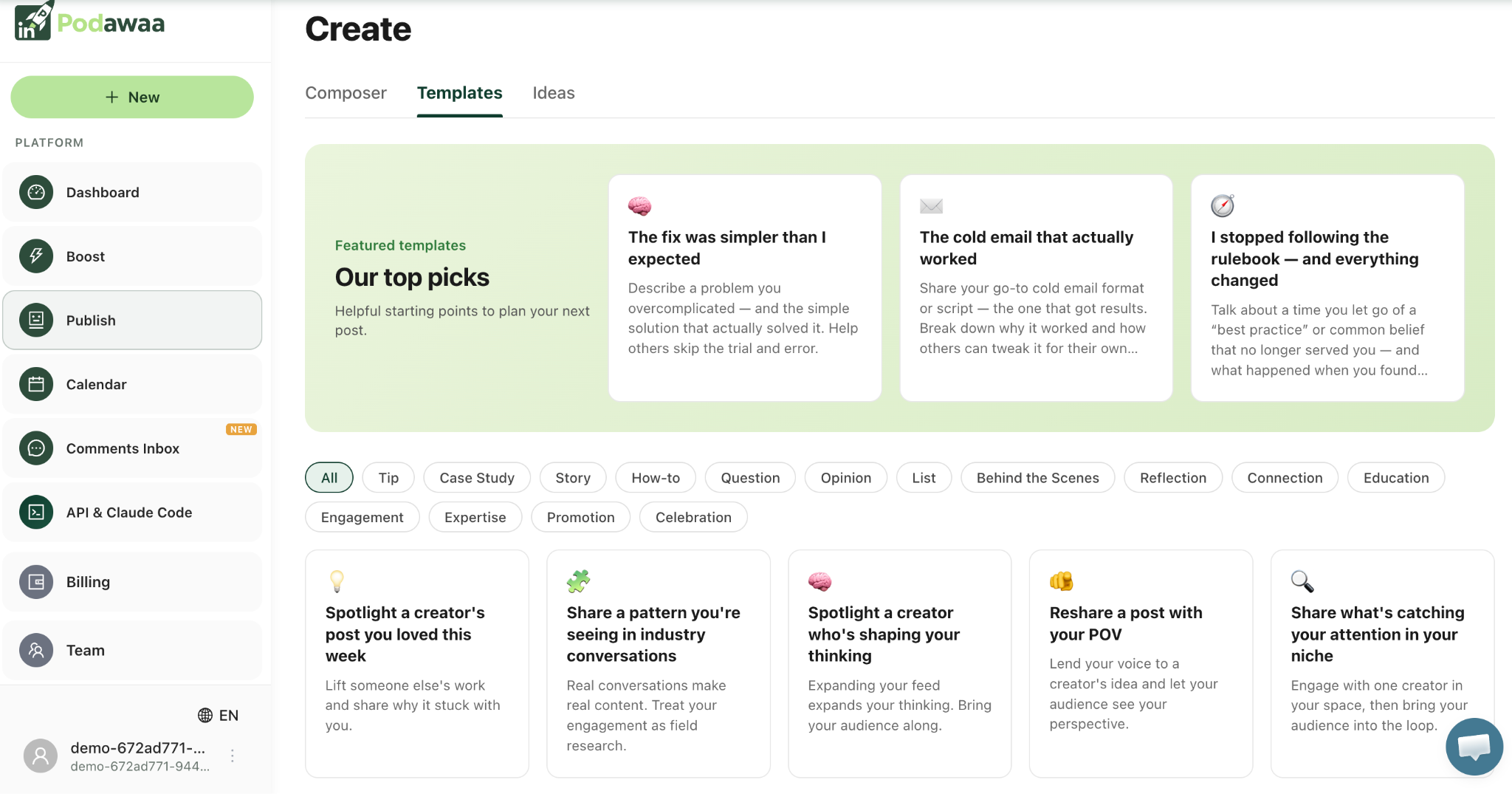
For a month of eight posts, aim for a mix across at least four different formats:
- One story post
- One case study
- One educational or how-to post
- One opinion or reflection
- One personal update or reintroduction
Here are the four formats worth including every month and why each one works:
1. Case study: "I tested it so you don't have to." "I tried this for 30 days and here is what happened" is a fundamentally different claim from "here are five tips." The first one is evidence. The second is opinion.
Case studies consistently earn more saves than most other formats because readers bookmark them to come back to. The result does not have to be positive. Posts where something did not work tend to perform just as well because they are honest.
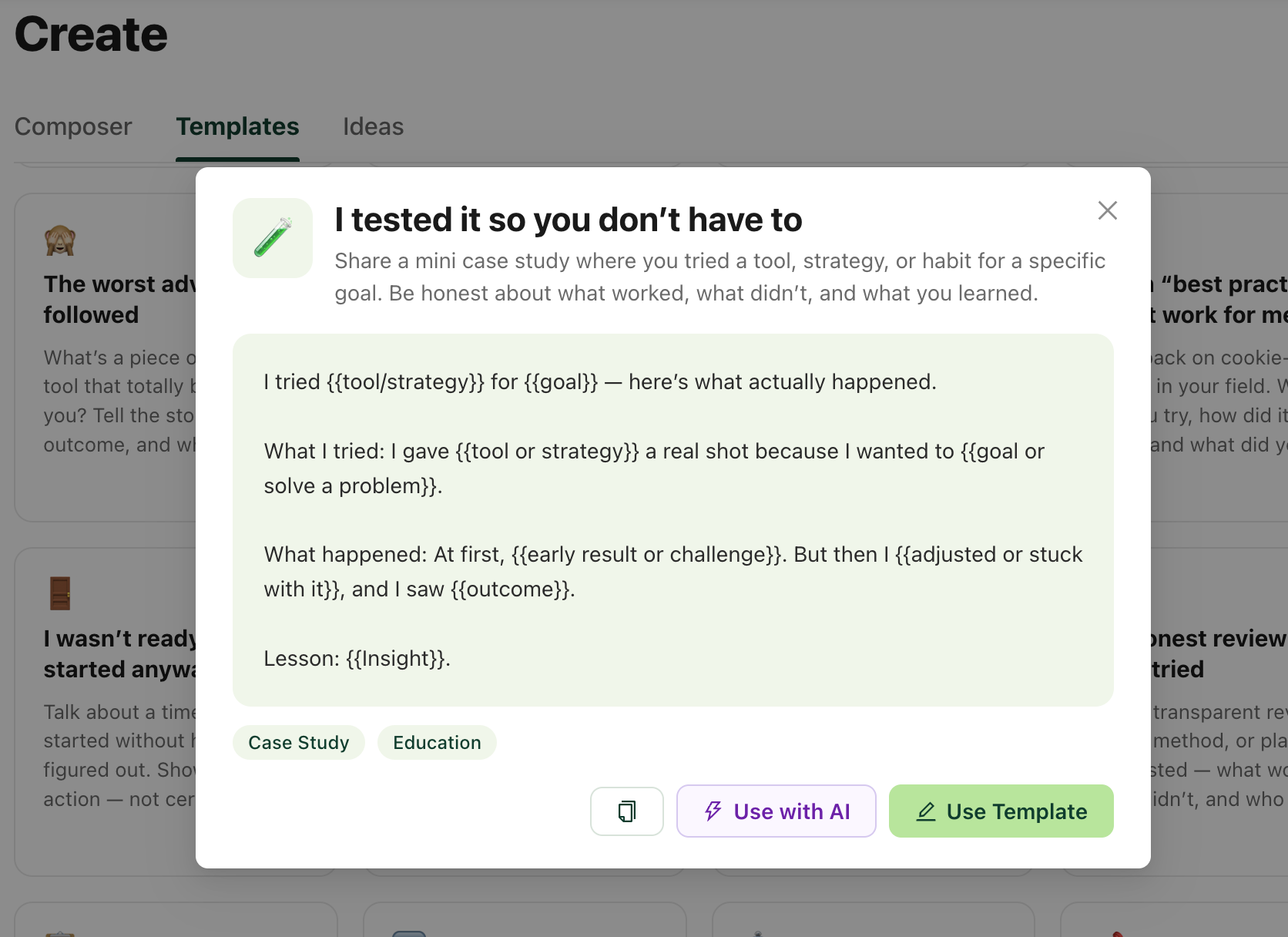
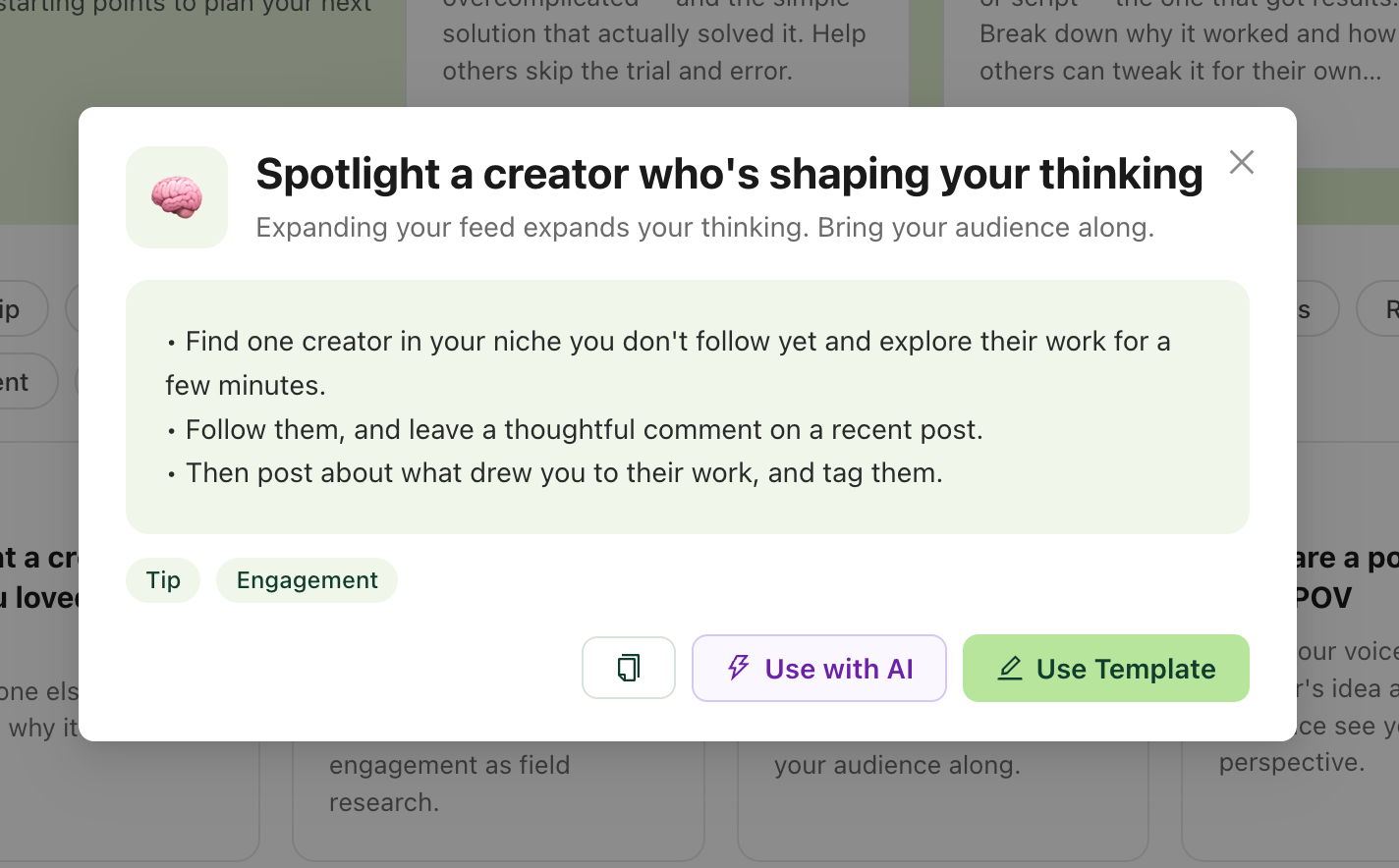
2. Creator spotlight: "Spotlight a creator who's shaping your thinking." Most LinkedIn content is self-referential. A post that genuinely focuses on someone else immediately stands out.
When you tag a creator with a real audience and the credit is genuine, that post can appear in feeds beyond your own followers. Audiences immediately recognize the difference between real credit and visibility tagging.
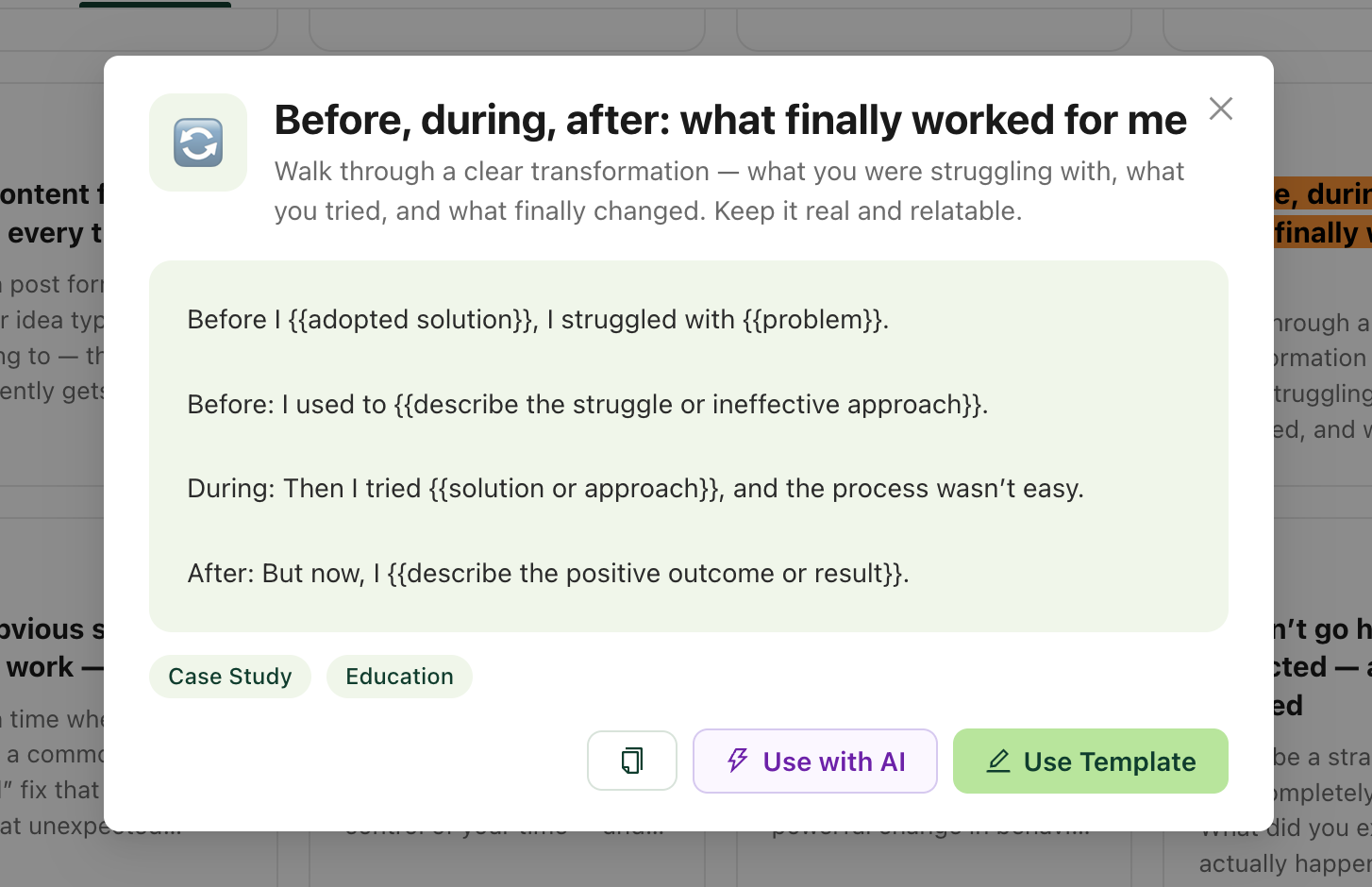
3. Transformation story: "Before, during, after: what finally worked for me." Transformation story posts work because they give readers a structure to follow.
You are not giving advice. You are showing what changed, which is far more convincing than a list of tips. Skip straight to the conclusion without showing where you started and the post loses most of its weight.
We found this pattern consistently in our review of 200 high-performing LinkedIn posts — story and contrarian formats drove 5x more comments than educational carousels from the same creator.
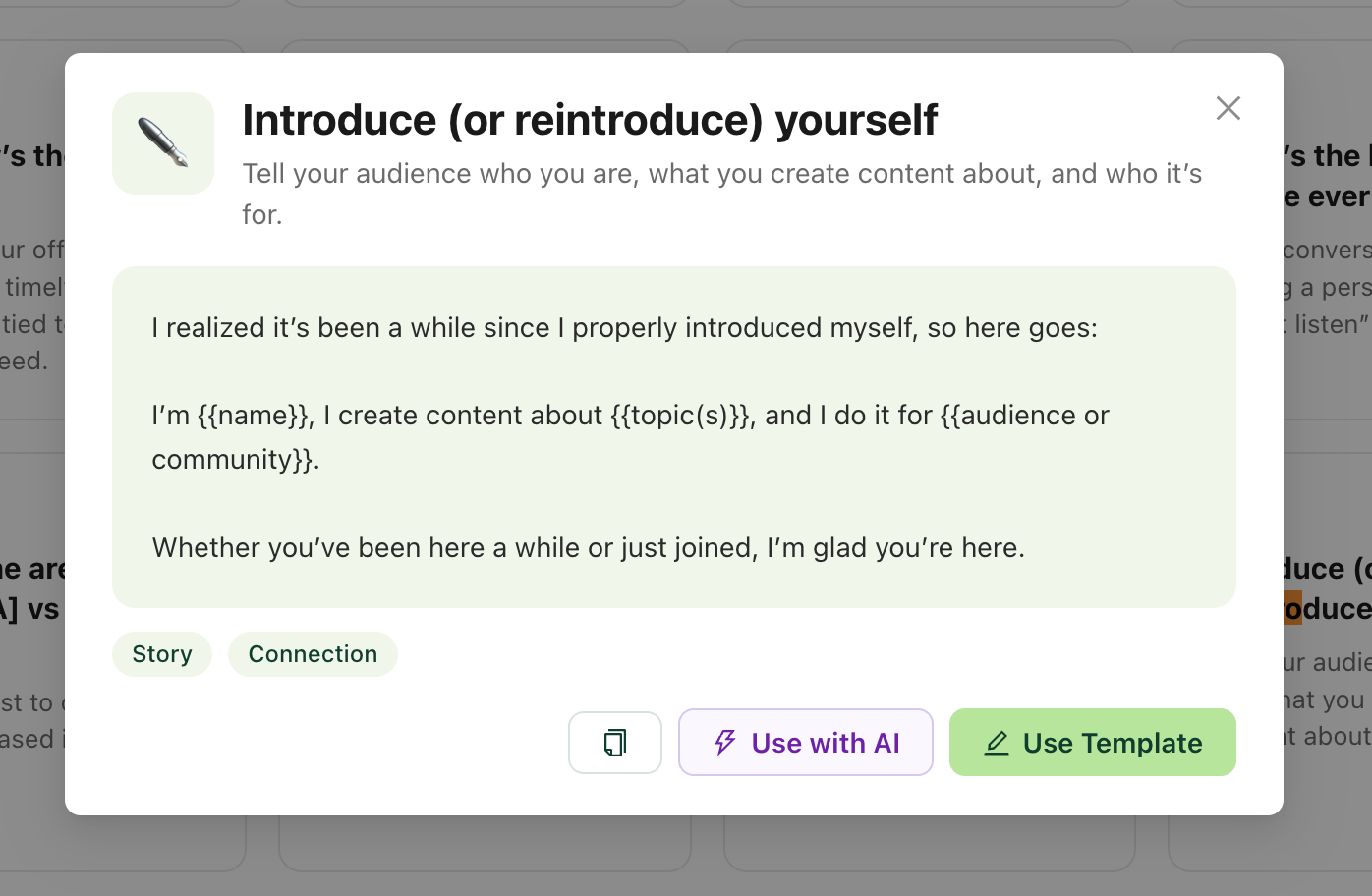
4. Reintroduction post: "Introduce or reintroduce yourself." Most creators use this format once and never return to it. But you should keep in mind that your audience changes constantly. Someone who followed you last week has no idea who you are.
Reintroduction posts consistently outperform expectations because they are so rare, and they give the algorithm a clearer signal about what kind of audience to put your content in front of.
Common mistake: Picking the same template format every month. If all eight posts follow the same structure, your content starts to feel predictable even to readers who genuinely enjoy what you write.
Step 3: Write Better LinkedIn Posts with AI
Pure AI-generated LinkedIn content has a recognizable pattern: generic opening, three to five bullet points, a closing question that invites engagement, and nothing that sounds like real experience. Technically correct and completely forgettable.
Use AI to start, not to finish. Here is how high-performing LinkedIn creators actually use it:
- Paste rough notes or bullet points from your own experience into the editor
- Let AI turn them into a first draft to react to
- Rewrite the draft in your own voice
- Cut anything that sounds generic
- Add the specific detail that only you would know
Inside Podawaa, you can use Podawaa Studio, which sits on the right side of the editor and lets you generate a first draft from your topic. It also improves what you have written, strengthens the hook, and scores the post before publishing.
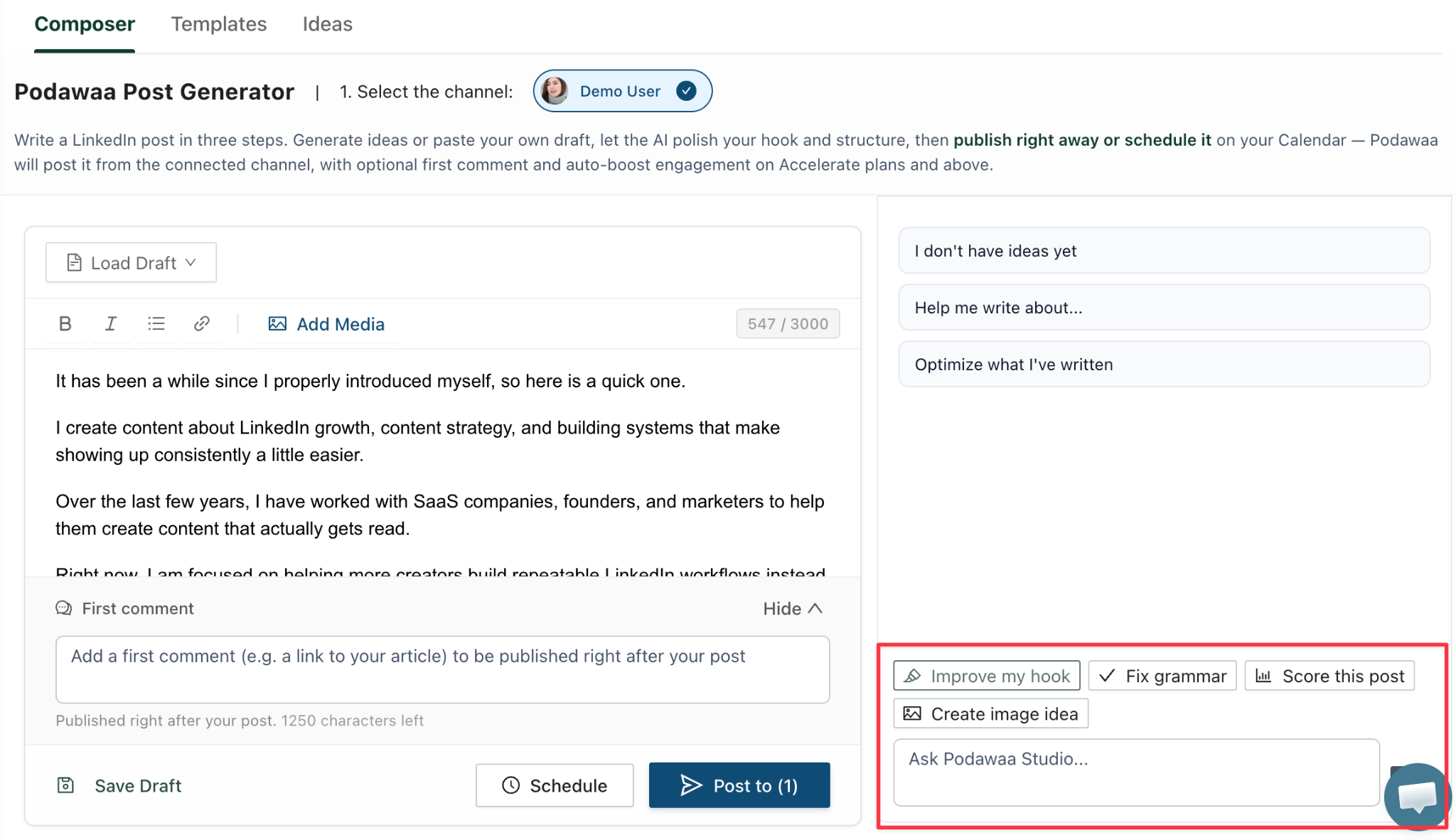
Here is what a well-written reintroduction post looks like:
It has been a while since I properly introduced myself, so here is a quick one.
I create content about LinkedIn growth, content strategy, and building systems that make showing up consistently a little easier.
Over the last few years, I have worked with SaaS companies, founders, and marketers to help them create content that actually gets read.
Right now, I am focused on helping more creators build repeatable LinkedIn workflows instead of starting from scratch every week.
If that sounds like something you care about, you are in the right place.
Notice what this does not do. It does not tell a life story. It answers three questions: who am I, what do I write about, and who do I help. Tag past employers or clients if you have them. It adds credibility and gives new readers context about your background.
One formatting note: posts that look like a wall of text lose readers before the second sentence. Keep paragraphs short, put one idea per line, and use white space. Most people read LinkedIn on mobile.
Our recommendation: Your experience is the most valuable part of the post. AI gives you the structure. You bring the substance.
Step 4: Improve Your LinkedIn Post Hook
LinkedIn cuts off the preview of a post after two or three lines. If those lines do not give someone a reason to stop scrolling, they never read the rest.
Most people write the hook last and end up describing the post instead of creating a reason to read it. Here is the difference:
Hook type
Example
Describes the post
"Today I want to share some things I have been thinking about."
Creates a reason to read
"Three things I got wrong about LinkedIn in my first year, and what I do differently now."
After reviewing high-performing posts across LinkedIn creator interviews and Reddit discussions, the hooks that consistently stopped people shared a few traits:
- They named a specific audience, number, or outcome
- They created curiosity without being vague
- They made a claim the reader wanted to see proven
- They avoided phrases like "I want to share" or "Here are my thoughts"
Before scheduling inside Podawaa, the Viral Potential score gives you a live signal on how strong your hook and overall structure are.
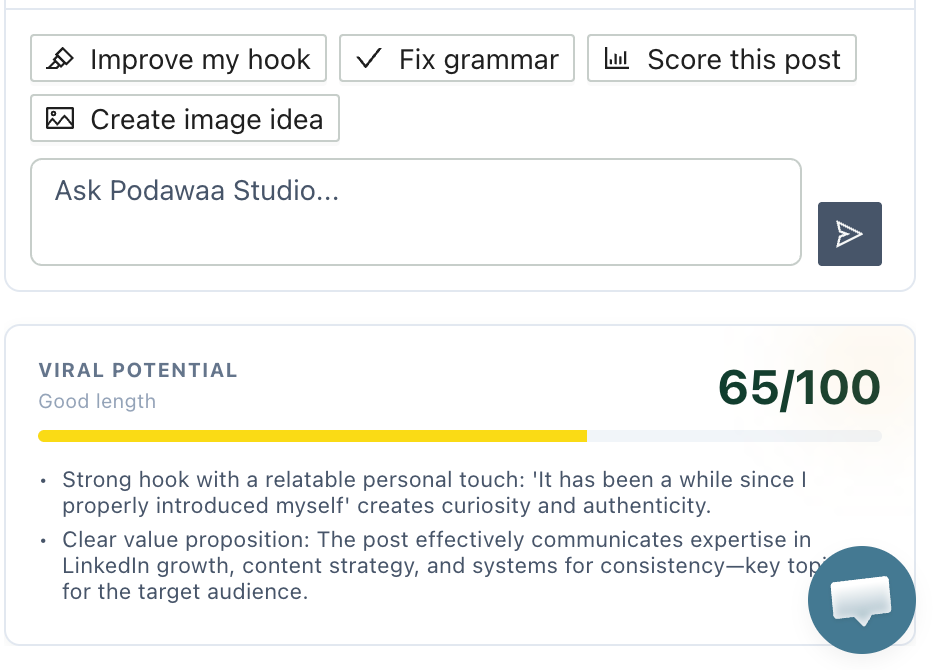
Write the hook last, then try two or three versions before picking one. We broke down dozens of real examples with explanations in our LinkedIn post hook examples guide.
Step 5: Write Your First LinkedIn Comment
When you comment on your own post, that comment appears separately in other people's feeds as its own activity. Someone who scrolled past your original post gets a second chance to see the same content through the comment. It shows up as new feed activity, which means it can reach people who never saw the post at all.
It also directly affects how far the post reaches in the first hour. LinkedIn weights comment activity heavily early on. A question in your first comment gives readers a specific and easy reason to reply. More replies in the first hour means wider distribution. We cover exactly how the algorithm uses that early signal in our breakdown of the first hour on LinkedIn.
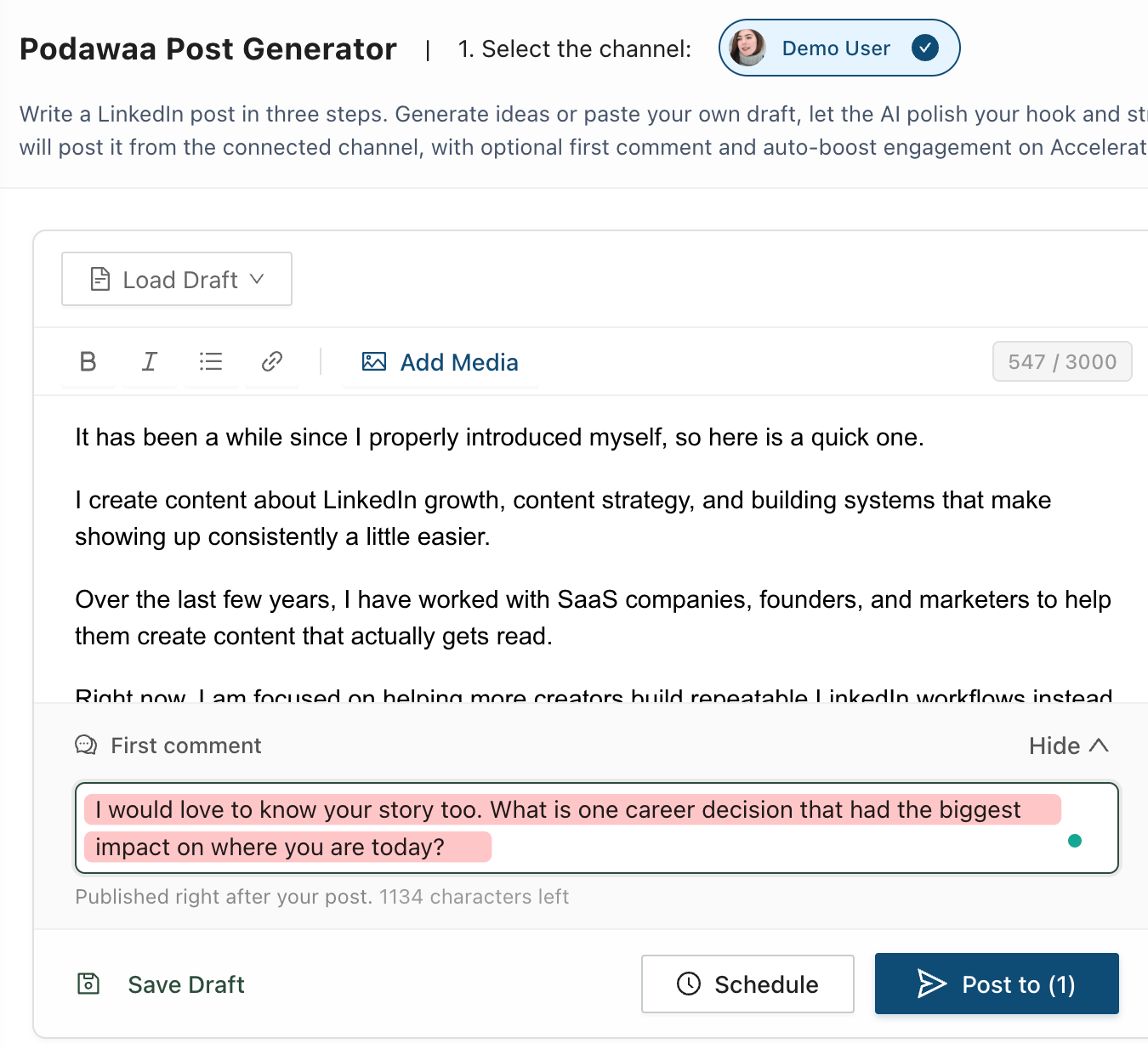
Three ways to use the first comment well:
- Ask a question that is easy to answer and invites a short reply
- Share a resource that goes deeper on what you wrote in the post
- Add a detail or example that did not fit in the main post itself
For the reintroduction post above, here is a first comment that works:
"I would love to know your story too. What is one career decision that had the biggest impact on where you are today?"
Easy to answer, no long response required, invites people into a real conversation.
What we noticed: Creators who consistently added a first comment reported better early engagement than those who published and moved on. The comment gives the algorithm a second signal that the post is worth distributing.
Step 6: Schedule Your LinkedIn Content
Schedule every post before the month starts. Do not leave any of them for later.
Once each post is written, the hook is strong, and the first comment is ready, schedule it and move to the next one. Inside Podawaa, the content calendar sits inside the same editor where you draft and add first comments.
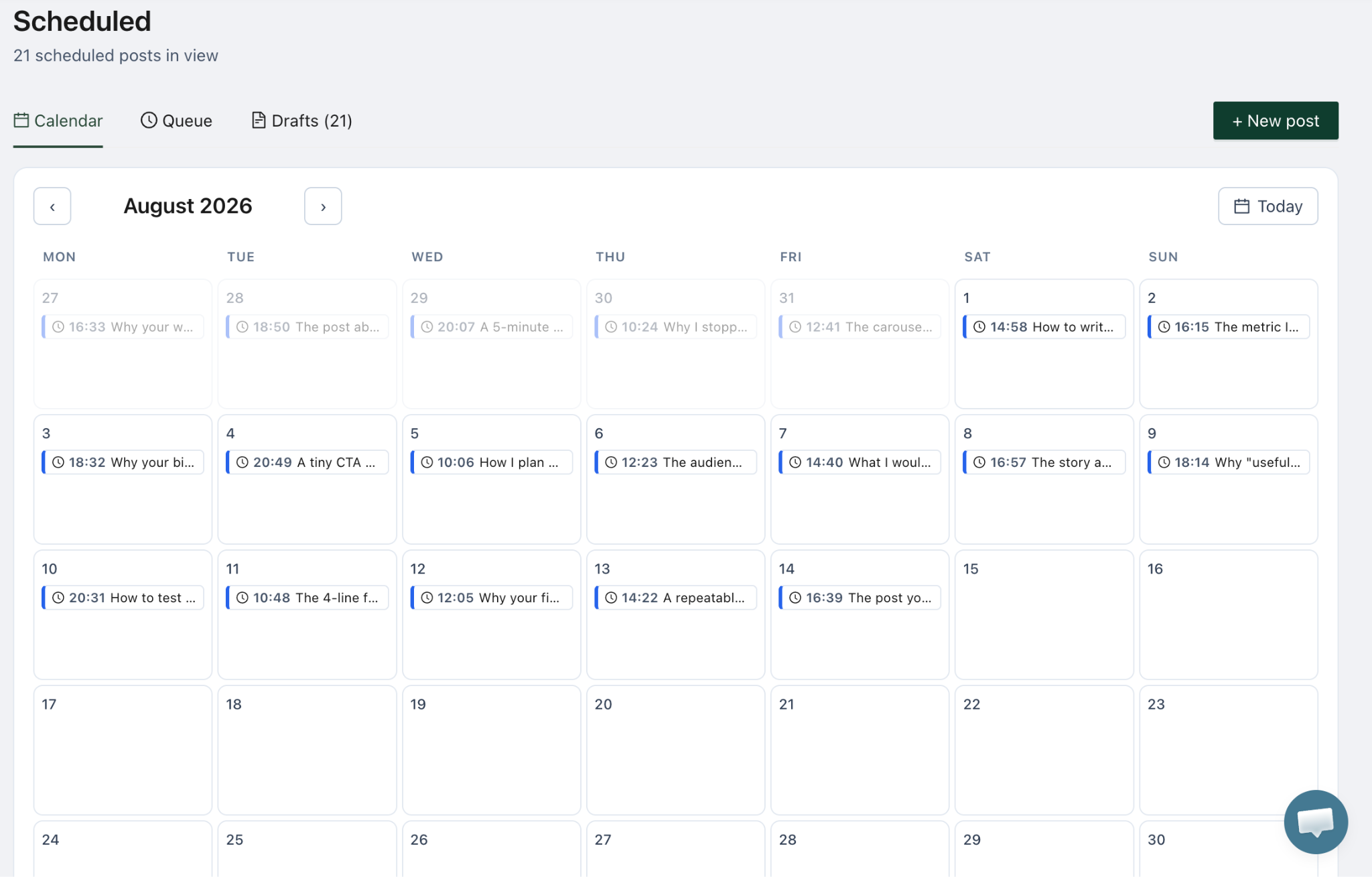
What most people miss about planning this way is not the time it saves in the moment. It is how much better the content becomes when you can see the whole month at once:
- Two posts covering the same angle back to back
- A week with no variety in format
- A month that is all opinion and no evidence or story
The calendar view shows you all of this before anything goes live. You cannot see any of it when you write post by post.
Once everything is scheduled, your focus shifts from creating to engaging. Responding to comments, watching which posts reach the right people, and noticing what topics generate the most discussion gives you the signal you need for next month.
For guidance on frequency and timing, see how often to post on LinkedIn and the best time to post on LinkedIn.
The biggest lesson: Scheduling is not about saving time. It is about removing the daily decision that kills consistency. Once the month is set, you never have to ask "what should I post today?" again.
Frequently Asked Questions
How many LinkedIn posts should I plan per month?
Eight posts, roughly two per week, is a solid starting point. It gives the algorithm enough signal to understand your topics and audience without requiring more than one planning session per month.
How many content pillars should I have on LinkedIn?
Two or three. More than three and your content starts to feel scattered to new followers. Less than two and you risk becoming repetitive. Your pillars should reflect what you want to be known for, not everything you find interesting.
Should every LinkedIn post try to sell something?
No. Most posts should build trust, teach something, or share a perspective. Promotional posts perform best when they are the exception, grounded in a real result rather than a direct pitch.
Should I use AI to write my LinkedIn posts?
Use it to draft, not to publish. Posts that are entirely AI-generated tend to read that way: generic tone, no specific examples, nothing that sounds like real experience. Use AI to get a first draft on the page, then rewrite it in your own voice and add your own stories.
How do I know if my LinkedIn hook is strong enough?
Try two or three versions before picking one. A strong hook names who the post is for, what it is about, or creates a specific reason to keep reading. Our LinkedIn post hook examples guide breaks down what actually works with real examples.
How do I build a LinkedIn content strategy from scratch?
Start with two or three content pillars. Pick eight post formats for the month using a mix of stories, case studies, educational posts, and personal updates. Write them all in one session, schedule them, and repeat next month. Consistency over time is what builds an audience, not any single post.