
Podawaa offers a free plan and three paid plans: Scale at €59/month, Accelerate at €89/month, and Dominate at €159/month (prices exclude VAT). Yearly billing costs about 17% less, and weekly plans take 80% off the first week.
The price changes with how much of your LinkedIn routine you want Podawaa to handle. Every plan can bring likes and comments to your posts from people in your field, and the higher plans add Studio for writing posts with AI, a comment inbox, and publishing from Claude Code.
I'll explain what each plan means in practice, with examples, and I'll also tell you when a plan isn't worth it for you.
Quick Answer: How Much Does Podawaa Cost?
- The free plan runs on Community, where your account engages with other members' posts, while every paid plan runs on Private and keeps your account out of that exchange
- The free plan gives you 5 boosts a month, up to 20 likes and 1 comment per post, the template library, and one Studio session to try AI writing
- Scale costs €59 a month for unlimited boosts, up to 50 likes and 10 comments per post, and industry targeting
- Accelerate costs €89 a month and adds Studio for 30 AI posts a month, 50 drafts, a comment inbox, and access to the Podawaa API
- Dominate costs €159 a month for up to 250 likes and 50 comments per post, unlimited Studio posts, and 20 repost boosts a month
- To publish LinkedIn posts from Claude Code, you need Accelerate or Dominate
- Pay yearly to save about 17%, and add extra accounts for €19, €39, or €59 a month each if you manage several profiles
Here's what each plan includes, with prices in euros:
1. Free Runs on Community, and Every Paid Plan Runs on Private
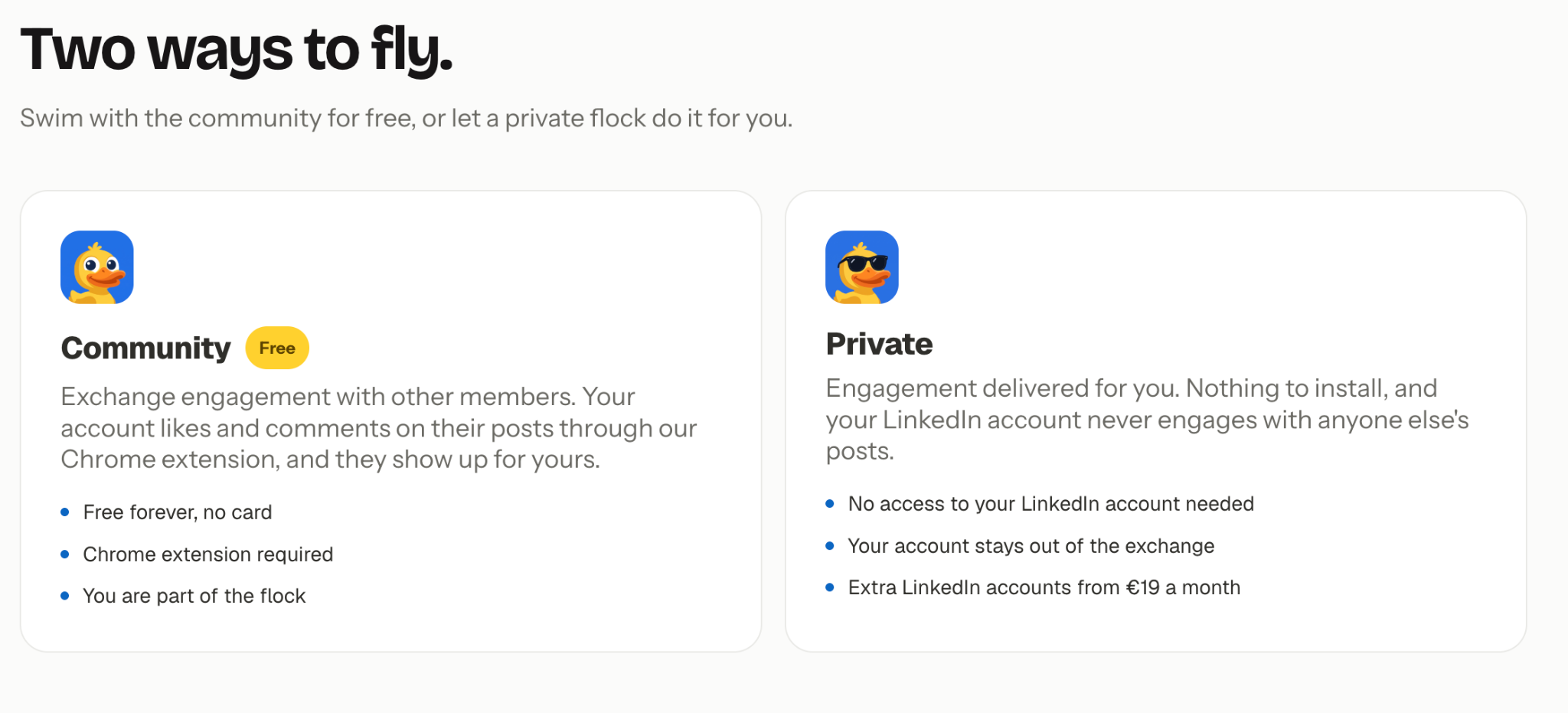
The free plan uses Community mode, which means your LinkedIn account also likes and comments on other members' posts in return for the engagement you get. Every paid plan uses Private mode, where your account never engages with anyone else's posts. This is the biggest difference between free and paid, so it's worth understanding before you look at features.
On Community, Podawaa's Chrome extension uses the LinkedIn session you already have open in your browser. It likes and comments on other members' posts from your account, with pauses between actions. The comments are written by AI in each post's language, and you don't approve them one by one. There's no pause button either, so to stop, you remove the extension or move to Private.
In practice, people who look at your LinkedIn activity will see likes and comments you didn't write yourself. If you're a founder using LinkedIn to connect with potential customers, it's worth thinking about how this might affect your professional image before choosing the free plan.
On Private, there's nothing to install and no LinkedIn login to share. Engagement on your posts comes from other Podawaa members, from their own LinkedIn accounts, matched by language (English, French, or Spanish).
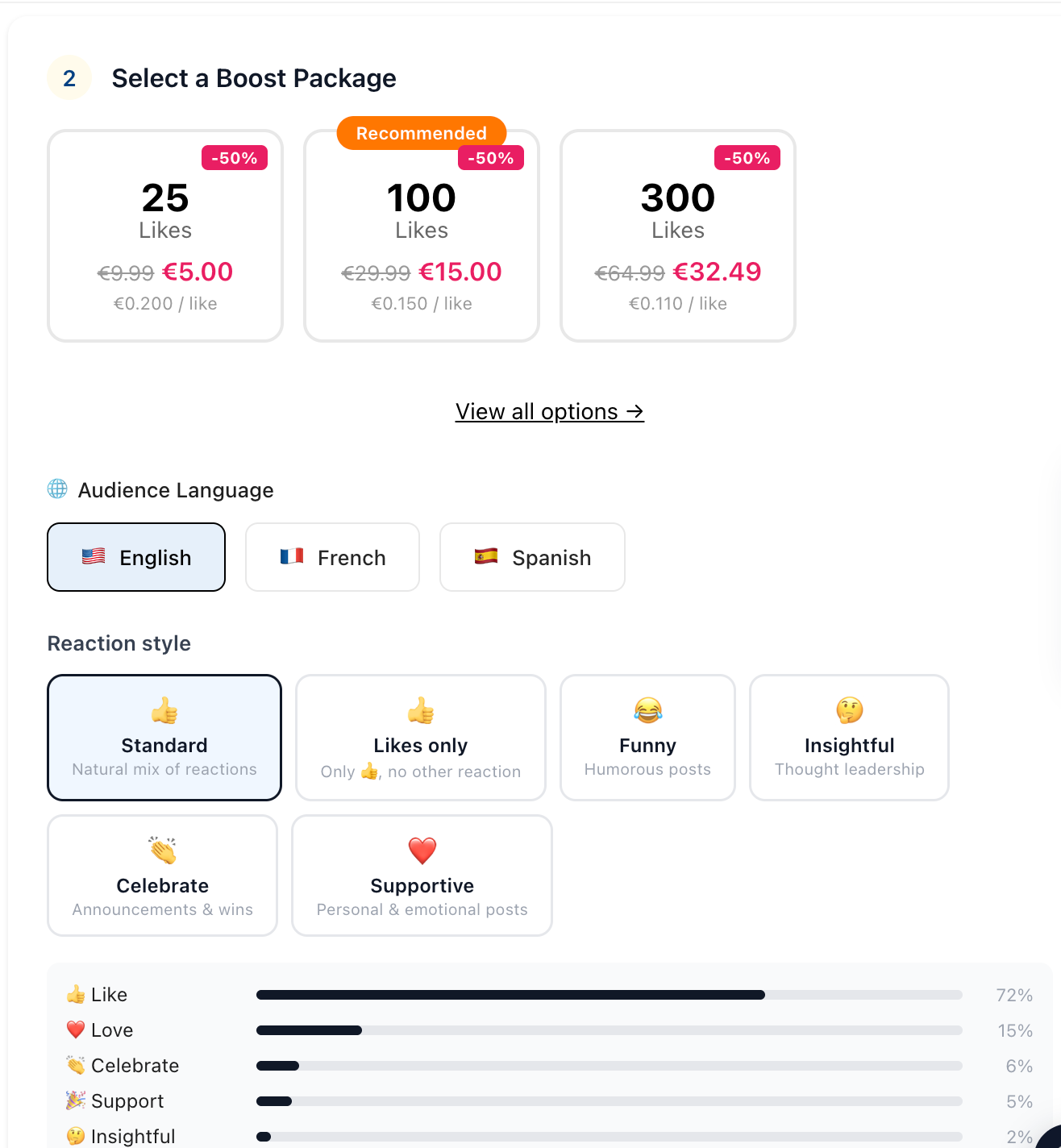
Our article on how Podawaa matches people to your post explains how those members are chosen and what matching can't do.
Here's how Podawaa sums up the two modes: on Community, your account takes part in the exchange through the Chrome extension, and on Private, it stays out of it and needs no access to your LinkedIn account.
In both modes, engagement arrives gradually over several hours, and sometimes over one to two days.
2. Free Plan: 5 Boosts a Month, Templates, and One Studio Session
The free plan gives you 5 boosts a month, up to 20 likes and 1 comment per boosted post, Growth Autopilot, the template library, 3 drafts, and one Studio session to try AI writing. Here's the free plan on Podawaa's pricing page.
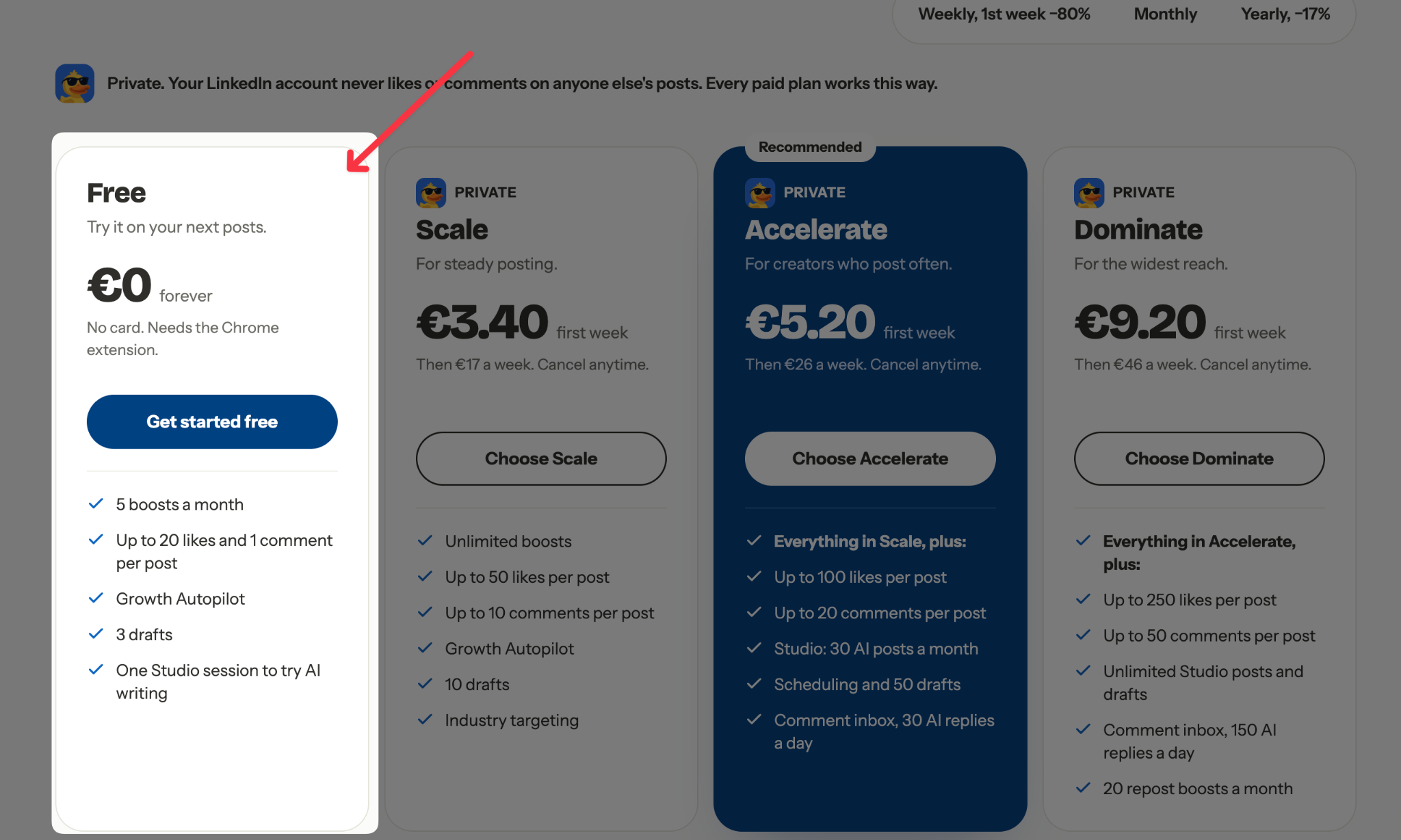
Five boosts cover about one post a week. If you post once a week, the free plan can boost every post you publish. If you post three times a week, two out of three posts get no boost.
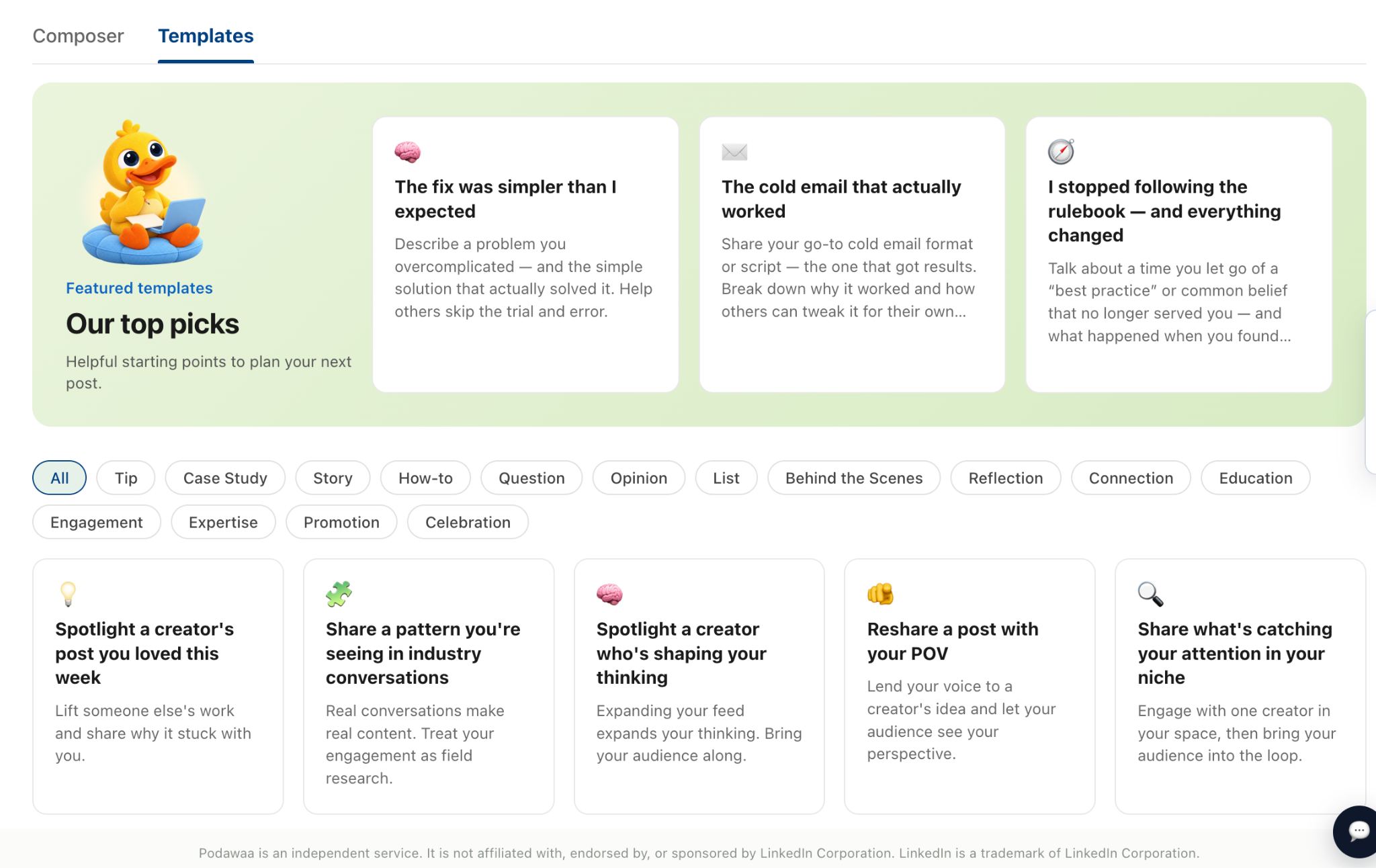
The template library is the free feature you'll probably use most, especially if you know you should post but can't decide what to say. Each template gives you an angle, such as "Share a pattern you're seeing in industry conversations," and you fill it in with your own experience.
For example, a founder could use that template to write about the three objections they heard most on sales calls this month.
Here's the template library on Podawaa, under Create, then Templates. Use the filters (Tip, Case Study, Story, How-to, Opinion, and more) to find the kind of post you want to write.
If you want to see how other people use these angles, our LinkedIn storytelling examples show 17 real posts you can adapt.
Growth Autopilot spots each new post you publish on LinkedIn and starts its boost for you, so you don't have to open Podawaa every time you post. The catch is that it boosts every new post, so your 5 boosts can run out in the first week if you post often. To choose which posts get a boost, turn Autopilot off in Settings and boost those posts by hand. Your 5 boosts are shared between Autopilot and manual boosts.
For example, a founder who posts twice a week could turn Autopilot off and save the free boosts for the posts that matter most, such as a hiring announcement or a lesson from a recent customer call.
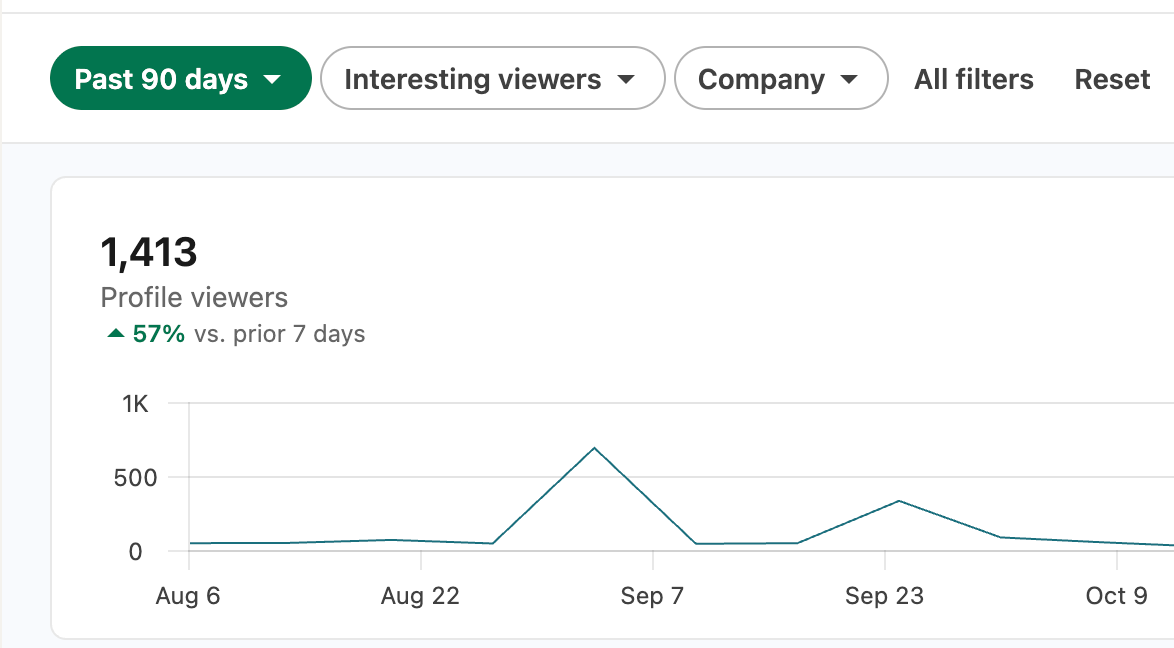
To get a fair picture during your free month, don't judge a boosted post by its likes alone. Look at what happens after: comments from people outside Podawaa, profile visits, and messages. LinkedIn shows profile visits on your profile viewers page, where you can pick a period (such as the past 90 days) and see when the number went up.
The free plan is worth it if:
- You want to see how engagement arrives on your own posts before paying
- You post about once a week
- You're fine with your account engaging with other members' posts
You'll outgrow the free plan if:
- You post more than once a week and want every post boosted
- You don't want to install a Chrome extension or let your account engage for others, because every paid plan is Private
3. Scale (€59/Month): Unlimited Boosts and Comments From Your Industry
Scale costs €59 a month, or €49.17 a month billed yearly. Every post you publish can get a boost, with up to 50 likes and up to 10 comments, and it runs on Private, so your account stays out of the exchange. Here's Scale on Podawaa's pricing page.
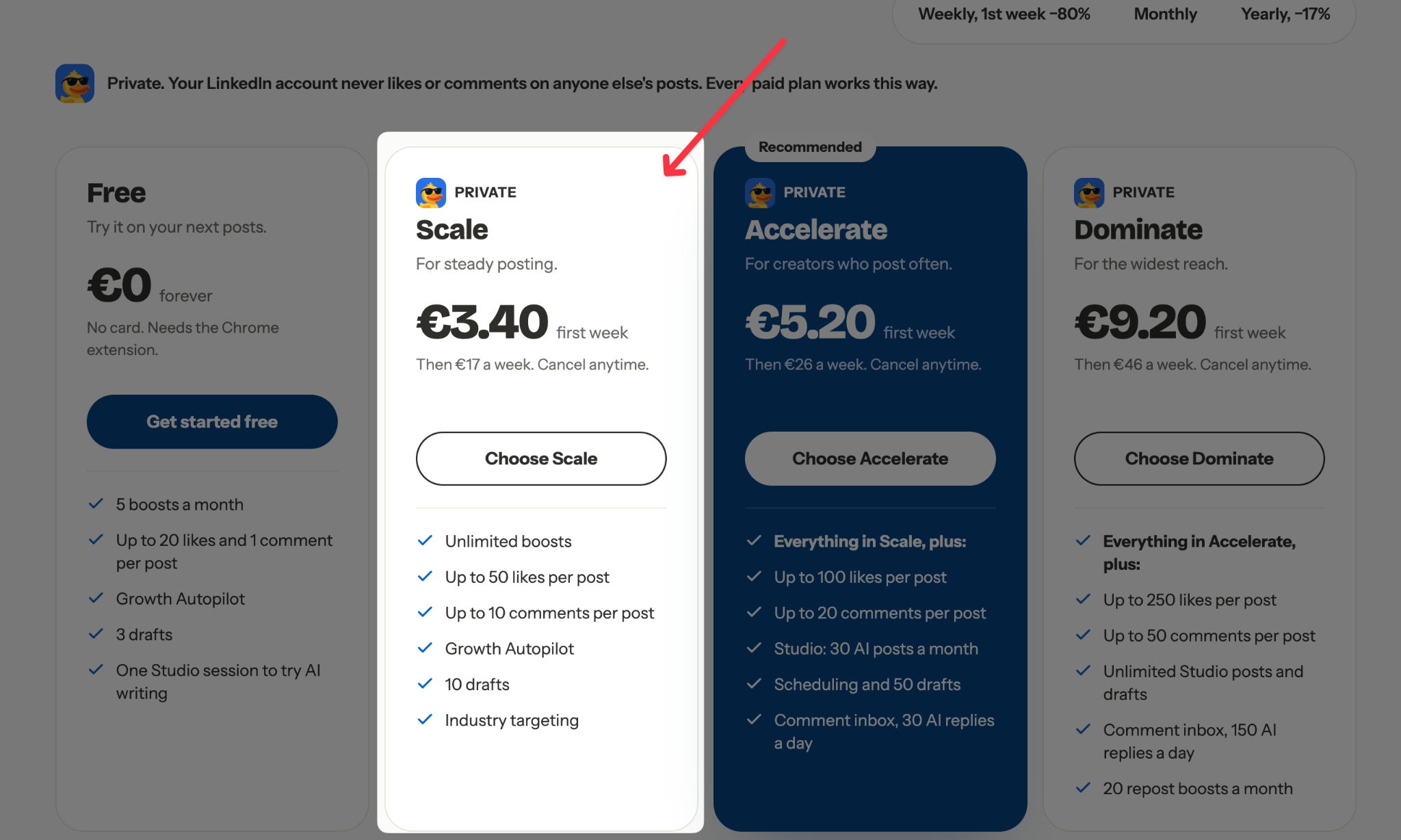
Boosts are unlimited, so the more you post, the less each boost costs you. If you post three times a week (about 13 posts a month), each boosted post costs around €4.50. If you post every weekday (about 22 posts), it's under €3 a post.
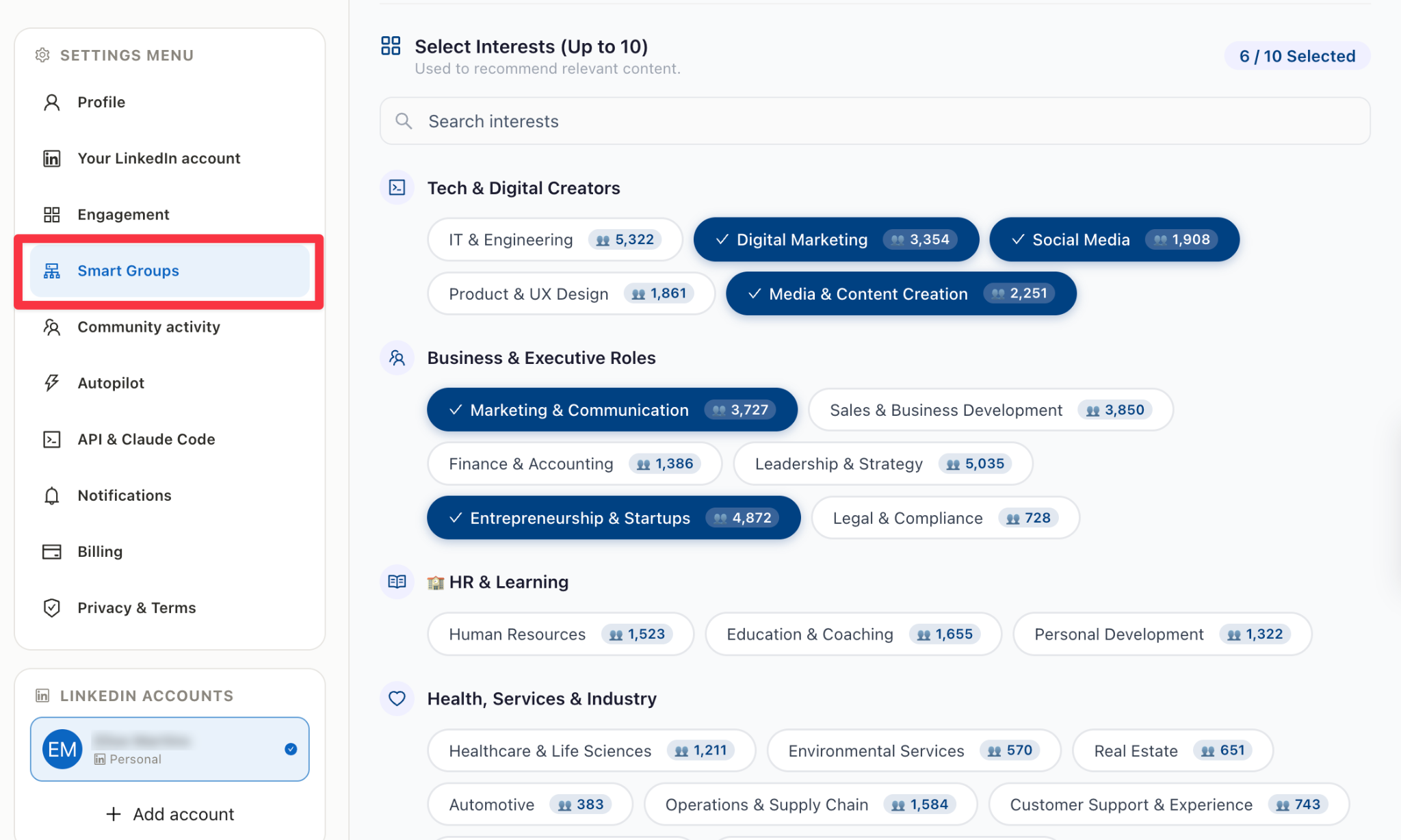
Scale also adds industry targeting which gives you more control over who engages with your posts. If you're a founder selling software to HR teams, for example, comments from people who work in HR are more relevant to you than comments from people outside your market.
On Podawaa, you choose them in Settings, under Smart Groups, where you can select up to 10 interests, such as Entrepreneurship & Startups or Human Resources.
The comments are written for each post, from what the post actually says and in the post's language. You can also write them yourself. For example, on Podawaa, you can add a comment such as "Did activation hold after 30 days, or did it drop back?" to a post about a product change, and a real member from your field posts it. Or you can let the member use their own words.
On a paid plan, if a boost still falls short after 72 hours of retries, Podawaa doesn't count it in your plan's usage, so you don't use up your plan on engagement that didn't arrive.
Scale doesn't include Studio, so you write every post yourself. Since the writing is all on you, check each post before it goes live. Our free Hook Tester compares up to three opening lines, and the Post Checker shows where LinkedIn cuts your post with "see more."
Scale is worth it if:
- You already write your own posts and know what you want to say
- You post more than once a week and want every post to get likes and comments
- You want engagement from your industry, without your account engaging for others
You don't need Scale if:
- You post less than once a week, because the free plan's 5 boosts already cover that
- Your real problem is finding time to write posts, because Scale has no Studio
4. Accelerate (€89/Month): Studio, a Comment Inbox, and the API
Accelerate costs €89 a month, or €74.17 a month billed yearly, and it's the plan Podawaa recommends for people who post often. You get everything in Scale with up to 100 likes and 20 comments per post, plus Studio (30 AI posts a month), 50 drafts, a comment inbox with 30 AI replies a day, and access to the API and Claude Code skill. Here's Accelerate on Podawaa's pricing page.
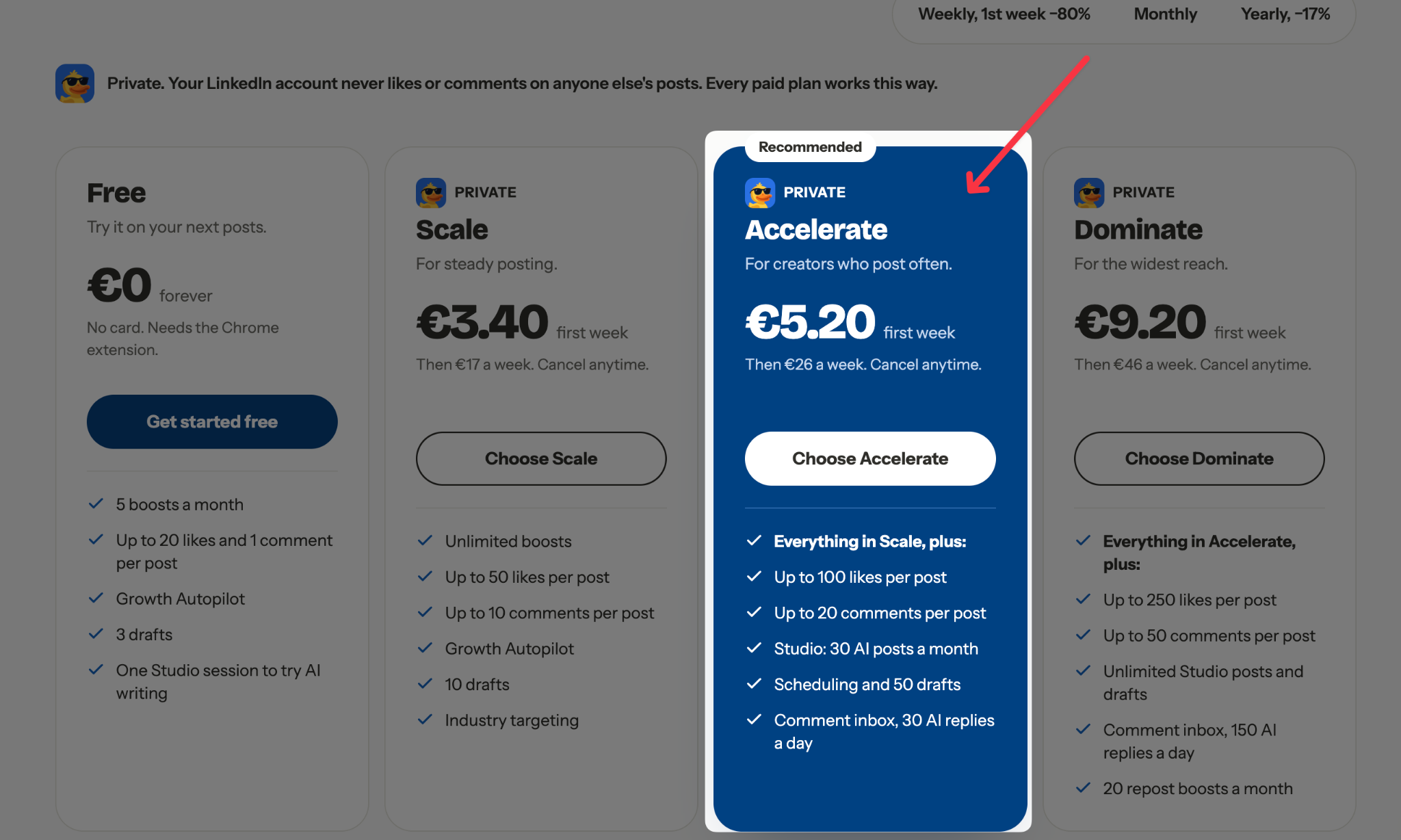
For €30 more than Scale, you're paying for time. For most founders, the boost isn't the hard part. The hard part is finding time to write posts, publish them on the right days, and answer comments while running a business.
Studio turns an idea into a ready-to-publish LinkedIn post you can edit. With 30 posts a month, that's enough for one AI draft a day. For example, you could give Studio a rough idea like "We stopped weekly status meetings and replaced them with a shared doc. Output went up, but new hires felt lost," and edit the post it writes until it sounds like you.
Studio works best when you already know the few topics you want to be known for. If you haven't picked them yet, our guide to choosing LinkedIn content pillars helps you settle on three.
With 50 drafts, you can write ahead when you have time and schedule each post for the time you pick. For example, you could write and schedule two weeks of posts on a Friday afternoon, and Growth Autopilot boosts each one as it goes live. The free Best Time to Post tool helps you choose the time slots, and our guide to planning a month of LinkedIn posts walks through the whole routine.
This video shows the full workflow for planning a month of LinkedIn content in about 30 minutes:
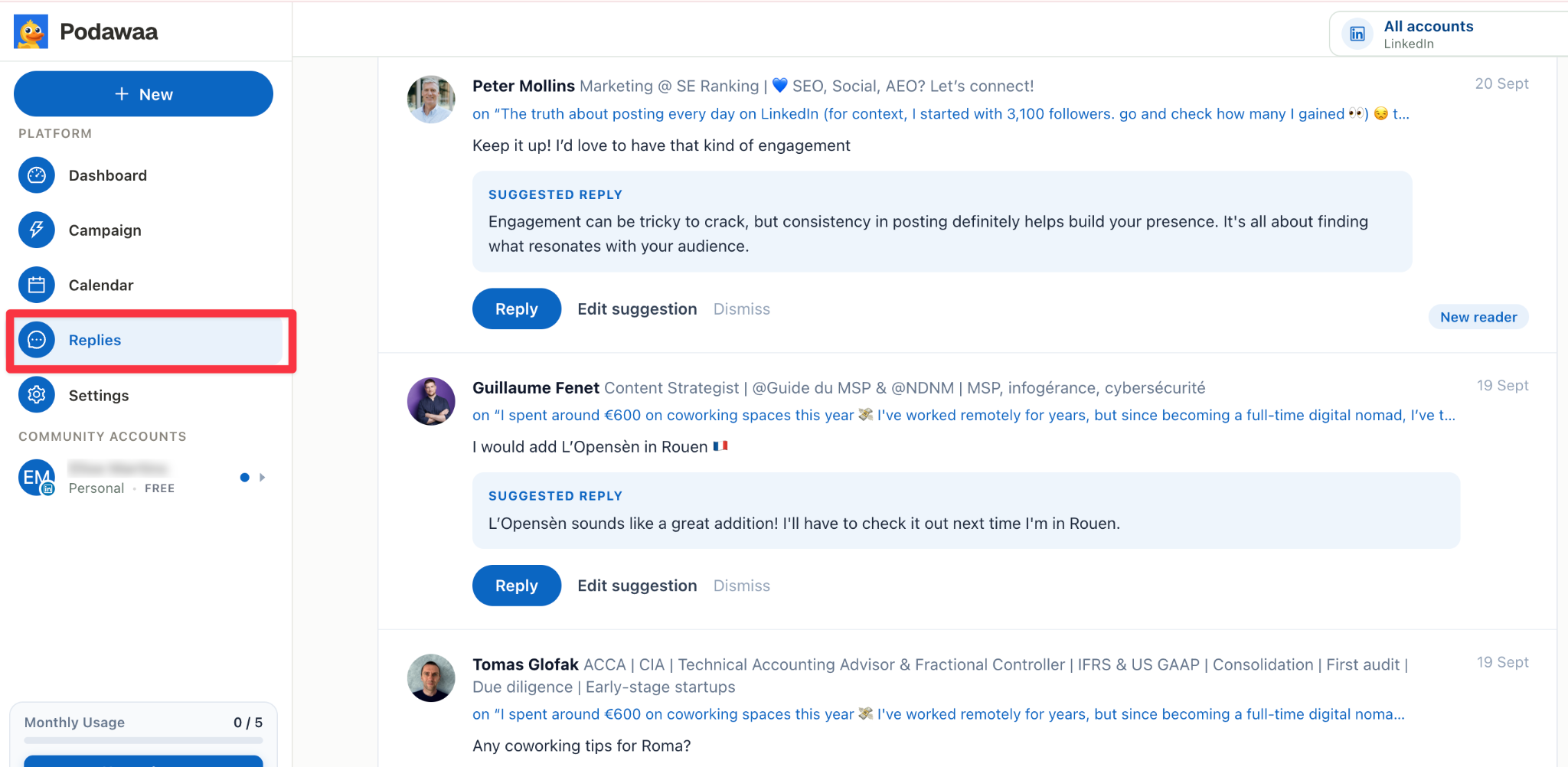
The comment inbox puts every comment on your posts in one place, with reply suggestions. For example, if someone asks, "How did new hires get up to speed without the meeting?" You open the comment, review the suggested reply, and adjust it before sending, for example: "We added a 15-minute walkthrough of the doc in their first week, and that fixed most of it."
Here's the inbox on Podawaa, under Replies. Each comment comes with a suggested reply you can send, edit, or dismiss.
Accelerate also unlocks the Podawaa API, so you can publish and schedule posts with one sentence from Claude Code. Our guide on posting to LinkedIn from Claude Code shows the setup, and if you'd rather connect a spreadsheet or Notion table, see our guide to automating LinkedIn posts with Zapier.
Accelerate is worth it if:
- You post several times a week and writing is what slows you down
- You'd rather plan a week or two of posts in one sitting than write every day
- You get comments you want to answer but lose track of them across posts
- You want to publish from Claude Code or an automation tool
You don't need Accelerate if:
- You already have posts written and only want them boosted, because Scale does that for €30 less
- You only need to schedule posts, because every Podawaa plan, including Free, lets you schedule posts in the Composer
5. Dominate (€159/Month): The Most Engagement, Unlimited Studio, and Repost Boosts
Dominate costs €159 a month, or €132.50 a month billed yearly, and gives each post the most engagement Podawaa offers. You get everything in Accelerate, plus up to 250 likes and 50 comments per post, unlimited Studio posts and drafts, a comment inbox with 150 AI replies a day, and 20 repost boosts a month. Here's Dominate on Podawaa's pricing page.
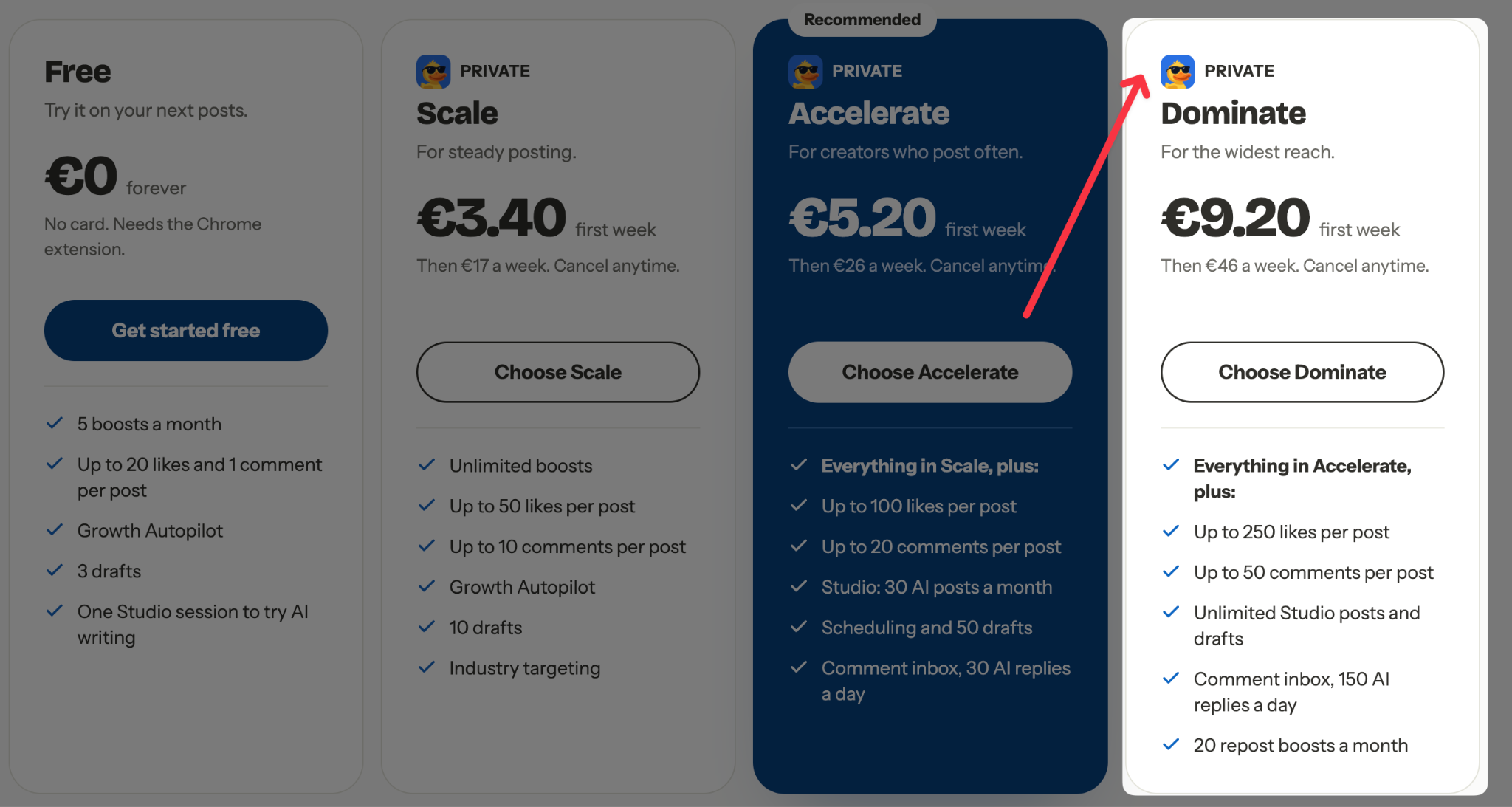
For €70 more than Accelerate, you mostly get higher limits. Accelerate's limits (30 Studio posts a month, 30 AI replies a day, 100 likes and 20 comments per post) are the ones a founder who posts daily hits first, and Dominate removes or raises all of them.
Dominate also add 20 repost boosts that help when you reshare something. For example, when you repost a customer's post about your product or one of your own older posts, Podawaa can boost the repost too.
Dominate is worth it if:
- You post every day and run out of Studio posts or AI replies on Accelerate
- You publish launches or announcements where you want the highest limits
- You often reshare customer posts or your own older posts
You don't need Dominate if:
- You post a few times a week, because Accelerate's 30 Studio posts and 30 AI replies a day usually cover that
- You want Claude Code or the API, because Accelerate already includes both
Billing and Agency Pricing: Weekly, Yearly, and Extra Accounts
You can pay monthly, yearly, or weekly, and agencies pay a lower price for each extra LinkedIn account. All prices are in euros and exclude VAT.
- Monthly: €59, €89, or €159, depending on the plan.
- Yearly: About 17% less than paying monthly.
- Weekly: The first week is 80% off (€3.40 on Scale, €5.20 on Accelerate, €9.20 on Dominate). After that, the plan renews every week at €17, €26, or €46.
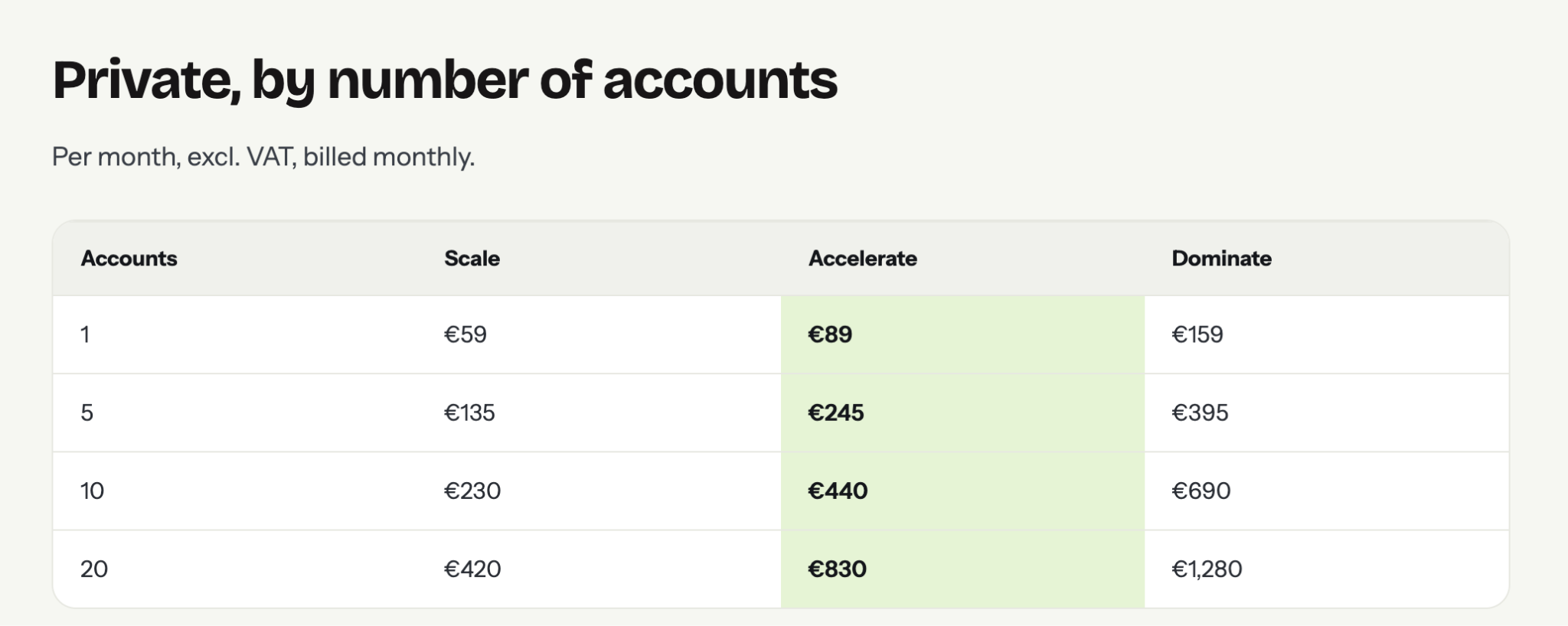
- Extra accounts: €19 on Scale, €39 on Accelerate, or €59 on Dominate a month for each account after the first.
Here's what a Private plan costs by number of accounts, billed monthly:
Our agency pricing page has the details for teams and agencies.
Test Podawaa on Your Own Posts
The quickest way to know which plan you need is to test Podawaa on your own posts. Start on the free plan, write a post from a template, and see how engagement arrives. Upgrade to Scale when you want every post boosted, or to Accelerate when you want help writing, replying, or posting from Claude Code.
Frequently Asked Questions
Is there a free trial of Podawaa's paid plans?
No. Instead, weekly plans take 80% off your first week, from €3.40, and then renew every week at the full weekly price until you cancel. You can also use the free plan with no card.
Can I change plans later?
Yes. You can upgrade or downgrade from your billing page. To move between Community and Private, write to team@podawaa.com.
Can I cancel or get a refund?
Yes. You can cancel from your billing page anytime, and your plan keeps running until the end of the period you've paid for. You can ask for a refund within 30 days of a payment by writing to team@podawaa.com.
What happens if a boost doesn't deliver?
On a paid plan, if a boost still falls short after 72 hours of retries, it isn't counted in your plan's usage. The free plan isn't covered.